
Inventory
An Inventory node is a stock location: a store of named items that activities draw from and replenish, so a model can include the materials, parts, and supplies a process consumes alongside the entities that flow through it.
On the Items tab you list what the inventory holds. Each item has a name, a starting quantity, an optional capacity and unit cost, and a reorder level and reorder quantity for automatic replenishment. Mark an item infinite supply when it should never run out.
Reordering
Section titled “Reordering”When an item’s stock falls to its reorder level, the inventory places an order for its reorder quantity, which arrives after a lead time. This models a shelf, a parts bin, or a raw-material store that tops itself up, with no logic on your part. An item marked infinite supply never reorders when stock is withdrawn, whatever these fields say. The one exception is at the start of a run: an infinite item that starts at or below its reorder level, with both reorder fields filled, still places one order.
Total capacity and statistics
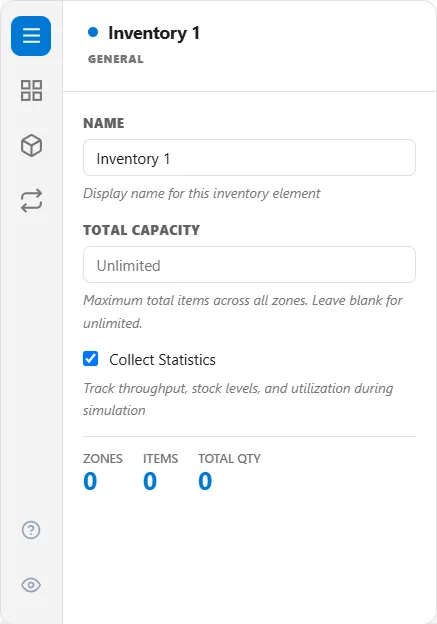
Section titled “Total capacity and statistics”On the General tab, Total Capacity is the most items the inventory can hold across all its zones. Leave it blank for unlimited, which is what the box reads to begin with; any number you enter is 1 or more. An item’s own capacity applies too, and the lower of the two is the ceiling (see Capacity on the Items tab). Collect Statistics is on by default. It tracks throughput, stock levels and utilization during the run.
A larger store can be split into zones with their own access times, so drawing from a far zone takes longer than a near one. The access time is charged once per withdrawal, and never on a deposit.
Substitutions
Section titled “Substitutions”The Substitutions tab lists fallback items to take when the one asked for is out of stock. A rule only fires when the logic statement asks for it with SUBSTITUTE.
The inventory node’s tabs
Section titled “The inventory node’s tabs”Items, Zones, and Substitutions each have their own tab, and every tab shows by default. The eye icon in the tab strip lets you hide the ones you do not use:
- Inventory Items: stock, cost, handling time, and replenishment
- Inventory Zones: named areas with their own access time
- Inventory Substitutions: priority-ordered fallbacks
Using it in logic
Section titled “Using it in logic”During a run, action logic moves stock with STORE, TAKE, and REQUEST (see Inventory statements), and you can read a level anywhere with Inventory("Name").Qty("Item").